
Today we are releasing Files Preview v4.1.2 for users of the preview version.
An update icon should be displayed in the top right corner of the app for existing users, while new users can get started from our download page. Additionally, you can help support the project by purchasing Files on the Microsoft Store or by sponsoring us on GitHub. Your support is greatly appreciated but entirely optional.
What’s Coming Soon
We’re excited to share that we’re actively working on a new Tree View sidebar that displays your folders in an expandable hierarchy, making it easier to navigate deeply nested directories. This change isn’t included in today’s release, but we hope to begin testing it in the Preview channel in the near future.
Want to hear about updates like this as soon as they happen? Join us on Discord, where we share previews, progress updates, and chat with the community.
What’s New in Files v4.1.2
Retain selection across layouts
When switching between layouts, the previously selected item now stays selected, so you don’t lose your place when changing layouts.
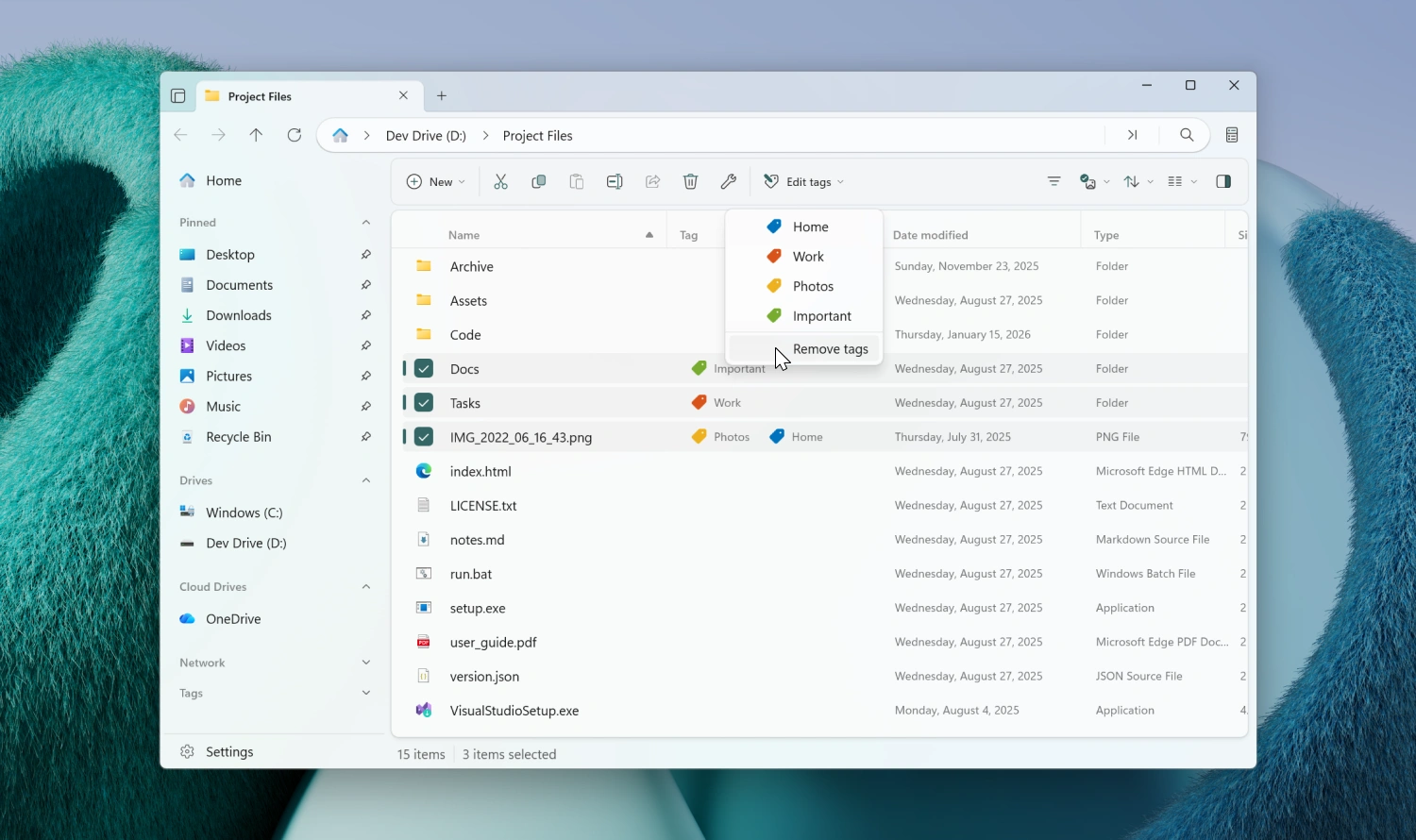
Remove all tags from a file
You can now quickly clear every tag assigned to one or more files. There are a few ways to use the new action:
- From the context menu — right-click an item, open the Tags submenu, and choose Remove tags.
- From the toolbar — when the Edit Tags button is pinned to the toolbar, the same option appears in its menu.
- From the Command Palette — open the Command Palette and search for Remove tags. You can also assign your own keyboard shortcut to it from Settings.
If you haven’t pinned the Edit Tags button to the toolbar, you can add it in a few steps:
- Right-click the toolbar and select Customize toolbar.
- Expand the File System group on the left.
- Drag Edit Tags… to the list of added toolbar items.
Updated OneDrive icon
The OneDrive icon has been updated to the latest version. Files now loads it directly from the OneDrive executable, so it always matches the icon used by OneDrive itself.
Fixes
- Fixed an issue where the Signatures page would occasionally cause a crash.
- Fixed an issue where the Play action wasn’t available when a single media file was selected.
- Fixed an issue where Smart Extract would extract archives to the wrong location when switching tabs.
- Fixed an issue where tag search excluded folders when grouping by type.
- Fixed an issue where thumbnails would sometimes fail to refresh after a file was modified.
- Fixed an issue where a BitLocker locked drive wasn’t displayed.
Conclusion
As always, we appreciate your feedback and suggestions on how to improve Files. You can reach us on Discord and on GitHub.
Thank you for using Files! 😊
Download Files Preview from the Microsoft Store | Sponsor us on GitHub